How to add runnable code examples to Docusaurus
Install the free docusaurus-plugin-onlinecompiler, add your widget key to docusaurus.config.js, and write runnable after a code block's language. Readers get a code editor with a Run button in the page: they change the code or its input and run it, with no account. The code runs on OnlineCompiler.io in a sandbox, in any of 46 languages, so your docs can run Python, C++ or SQL as easily as JavaScript.
What do readers see?
A runnable block shows the code in an editor, with a Run button and a console under it. This is a Docusaurus docs page with one runnable Python example, after a reader pressed Run:
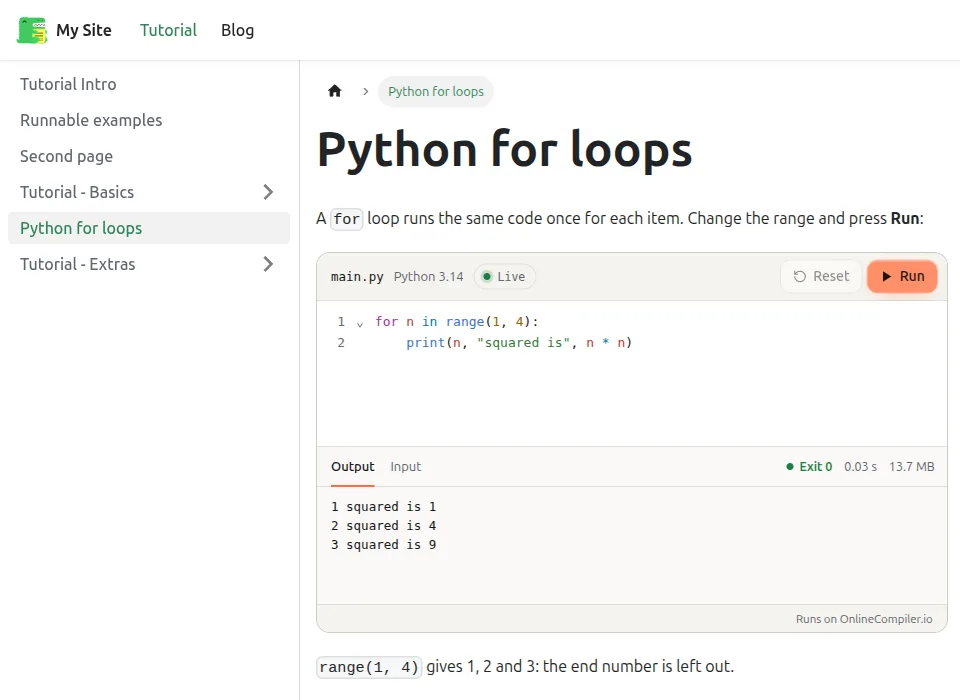
The page's Markdown is an ordinary code block with one extra word:
```python runnable
for n in range(1, 4):
    print(n, "squared is", n * n)
```1 squared is 1
2 squared is 4
3 squared is 9Readers can change the range or anything else and press Run again, and the Input tab holds what the program reads.
How do I install the plugin?
npm install docusaurus-plugin-onlinecompilerThen add it to your config with your widget key:
// docusaurus.config.js
export default {
  // ...the rest of your config
  plugins: [['docusaurus-plugin-onlinecompiler', { key: 'YOUR_WIDGET_KEY' }]],
};
It works with Docusaurus 3 and the classic theme, with either bundler (Rspack or webpack). The package is on npm and its code is public on GitHub, so you can read exactly what it does.
How do I get a widget key?
- Open the Widgets page of the OnlineCompiler.io dashboard and sign in with Google. The account is free.
- Create a widget key. Set its allowed domain to your docs site's domain exactly as visitors see it:
docs.example.comandexample.comare different domains. For local previews onlocalhost, make a second key. - Put the key in the plugin's
keyoption.
To keep the key out of the config file, read it from the environment:
plugins: [
  ['docusaurus-plugin-onlinecompiler', { key: process.env.ONLINECOMPILER_WIDGET_KEY }],
],
How do I make a code block runnable?
Write runnable after the language of any fenced code block, in a .md or .mdx page. The block's language picks the compiler: python runs Python 3.14, cpp runs C++ with G++ 15, js runs Node.js 24, sql runs SQLite,
and compiler ids such as openjdk-25 work too. Code blocks without the word stay as they
are.
The code comes through exactly as written, <, & and quotes included:
```cpp runnable
#include <iostream>
#include <vector>

int main() {
    std::vector<int> v{1, 2, 3};
    int sum = 0;
    for (int x : v) sum += x;
    std::cout << "sum & done: " << (sum < 10 ? "<10" : ">=10") << "\n";
}
```sum & done: <10To run a block with another compiler than its language suggests, add lang=. Other options,
such as a title, still work. This one runs Python with pandas 2 and printed 2.3.3 when we
ran it:
```python title="frame.py" runnable lang=python-3.14-pandas2
import pandas as pd
print(pd.__version__)
```
Runnable blocks work inside admonitions, Tabs and any MDX component. Each tab below holds its own
runner; the JavaScript one printed [ 2, 4, 6 ] and the Go one hi from Go:
import Tabs from '@theme/Tabs';
import TabItem from '@theme/TabItem';

<Tabs>
<TabItem value="js" label="JavaScript">

```js runnable
console.log([1, 2, 3].map((x) => x * 2));
```

</TabItem>
<TabItem value="go" label="Go">

```go runnable
package main

import "fmt"

func main() { fmt.Println("hi from Go") }
```

</TabItem>
</Tabs>
Which options does the plugin have?
| Option | Default | What it does |
|---|---|---|
key | none | Your widget key. Without one, runnable blocks show as plain code and the build warns. |
theme | "site" | "site" follows your site's light or dark mode as readers switch it. "light", "dark" or "auto" (the reader's system setting) fix it. |
languages | {} | Your own code block languages, mapped to compiler ids: { py3: "python-3.14" }. |
Runners follow readers as they move between pages without a reload, and switch between light and dark with the site. The widget documentation covers what the widget itself can do.
What other ways are there to run code in Docusaurus?
| Approach | Languages | Where the code runs |
|---|---|---|
@docusaurus/theme-live-codeblock | React components (JSX) | In the reader's browser, rendered as a live React preview |
| Python in the browser (themes built on Brython, Pyodide or PyScript) | Python only | In the reader's browser; Pyodide and PyScript first download a Python runtime |
| This plugin | 46 languages, Python with NumPy and pandas included | In a server sandbox on OnlineCompiler.io; the browser shows the editor and the output |
The live code block and this plugin both replace Docusaurus's code block component, so a site can use
only one: if you list both, the one listed last in themes wins. For React component demos,
use the live code block; for programs in any other language, use this plugin.
Can I do it without a plugin?
Yes. Load the widget script in docusaurus.config.js and wrap a code block in a runcode div in MDX. The runnable code
examples page has the exact steps. The plugin is simpler: one word per block, and the script loads
only on pages that need it.
Why doesn't my runnable block run?
| What you see | Why | Fix |
|---|---|---|
| Plain code, and "No widget key, so runnable code blocks show as plain code" in the build | The plugin has no key, or the environment variable it reads is empty. | Set the key option. |
| Plain code, and "A runnable code block shows as plain code: OnlineCompiler.io doesn't run ..." in the build | The block's language isn't one OnlineCompiler.io runs, or lang= names no compiler. | Use a language from the compiler list, or map your own name with the languages option. |
| "OnlineCompiler.io refused this widget's key (Origin not allowed for this API key)" | The key's allowed domain isn't the domain the page is on, often a preview or localhost. | Set the allowed domain to the address in the browser's address bar, or make a second key for previews. |
| "OnlineCompiler.io refused this widget's key (Authentication failed)" | The key was mistyped, deleted or turned off. | Copy the key again from the Widgets page. |
| Plain code with no warning, on a site that also uses live code blocks | @docusaurus/theme-live-codeblock replaced the code block component after this plugin. | Use one of the two. |
Frequently asked questions
How do I run Python code in Docusaurus?
Install docusaurus-plugin-onlinecompiler, add your widget key to docusaurus.config.js, and write runnable after the language of a Python code block (```python runnable). Readers can then edit the code and run it in the page and see its output. The same works for C++, Java, Go, Rust, SQL and the other languages.
Is the plugin free?
Yes, and it is open source (MIT). Running code uses your OnlineCompiler.io account, whose free plan has 100,000 runs a month with no credit card. Each press of Run is one run.
Do readers need an account?
No. Readers edit and run the code without signing in. Only the docs owner needs an OnlineCompiler.io account, for the widget key.
Does the code run in the reader's browser?
No. It runs on OnlineCompiler.io, in a fresh sandbox for each run with no network access. That is why the same docs can run C++, Rust, Java or SQL, not only JavaScript, and why your docs host needs nothing installed.
Does it slow down my docs?
No. The widget script loads only on pages with a runnable block, after the page has loaded, and each runner connects only when it scrolls into view. Pages without runnable blocks load nothing extra.
Can search engines read the code?
Yes. The code is in the page's HTML as text, so search engines index it and readers see it before the editor loads. If OnlineCompiler.io can't be reached, readers still see the code; only the Run button needs the service.
Which languages can I use?
Python, C, C++, Java, C#, F#, Go, Rust, PHP, Ruby, Haskell, TypeScript, JavaScript, SQL, DuckDB, Bash, Fortran, Visual Basic, Kotlin, R, Swift, COBOL, Perl, Julia, Pascal, Octave, Assembly, Lua, OCaml, Common Lisp, Erlang, Elixir, Prolog, D, FreeBASIC, Dart, Clojure, Groovy, Scala, Zig, Nim, Crystal, Ada, PowerShell, Racket, Objective-C.
Is the widget key secret?
No. A widget key is made to sit in public pages: it can run code in the widget, but it can't call the REST API. Its allowed domain is what stops other sites from using it.