How to add an online compiler to WordPress so readers can run your code examples
Install the free OnlineCompiler.io Code Runner plugin, paste a widget key, and add a Code runner block to any post. Readers get a code editor with a Run button in the page: they change the code or its input and run it, with no account. The code runs on OnlineCompiler.io in a sandbox, so your hosting needs no Python, Java or compiler, in any of 46 languages.
What do readers see?
A Code runner shows the code in an editor, with a Run button and a console under it. This is the Python example from this guide on a WordPress post, after a reader pressed Run:
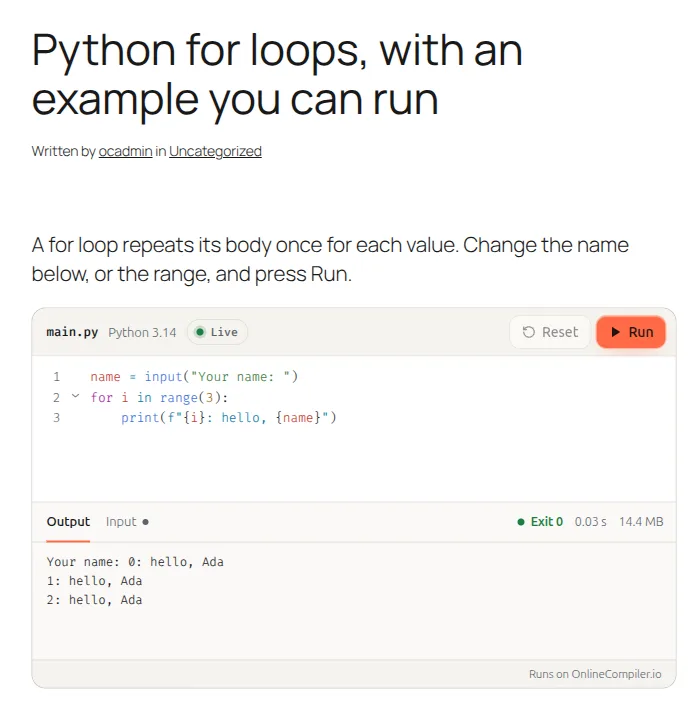
Syntax highlighters only show code. This runs it: readers can change the name, the range or anything else and press Run again, and the Input tab holds what the program reads.
How do I install the plugin?
- Download the plugin from GitHub: Code, then Download ZIP.
- In WordPress, go to Plugins, Add New Plugin, Upload Plugin, choose the ZIP, then Install Now and Activate.
It needs WordPress 6.3 or later and PHP 7.4 or later. The plugin is in review for the WordPress.org plugin directory; once it is listed, you will also find it under Plugins, Add New Plugin by searching for OnlineCompiler. Its code is public on GitHub, so you can read exactly what it does.
How do I connect it to OnlineCompiler.io?
- Open the Widgets page of the OnlineCompiler.io dashboard and sign in with Google. The account is free.
- Create a widget key. Set its allowed domain to your site's domain exactly as visitors see it:
www.example.comandexample.comare different domains. The plugin's settings page shows the one to use. - In WordPress, go to Settings, OnlineCompiler.io, paste the key and save. You can also choose the default language, the theme (light, dark, or the reader's system setting) and whether the buttons are in English, Portuguese or Spanish.
Until a key is saved, a Code runner shows its code as plain text, and administrators see a note under it saying the key is missing. A widget key is made to sit in a public page: it can run code in the widget but can't call the REST API, and its allowed domain keeps other sites from using it.
How do I add a runnable code example in the block editor?
- In a post or page, add a block and search for Code runner (it is in the Widgets group).
- Write or paste the code readers start from, and, if the program reads input, its standard input in the box under it.
- In the sidebar, choose the language. The other settings are optional: theme, editor height, read-only code and the language menu.
- Publish, open the post and press Run.
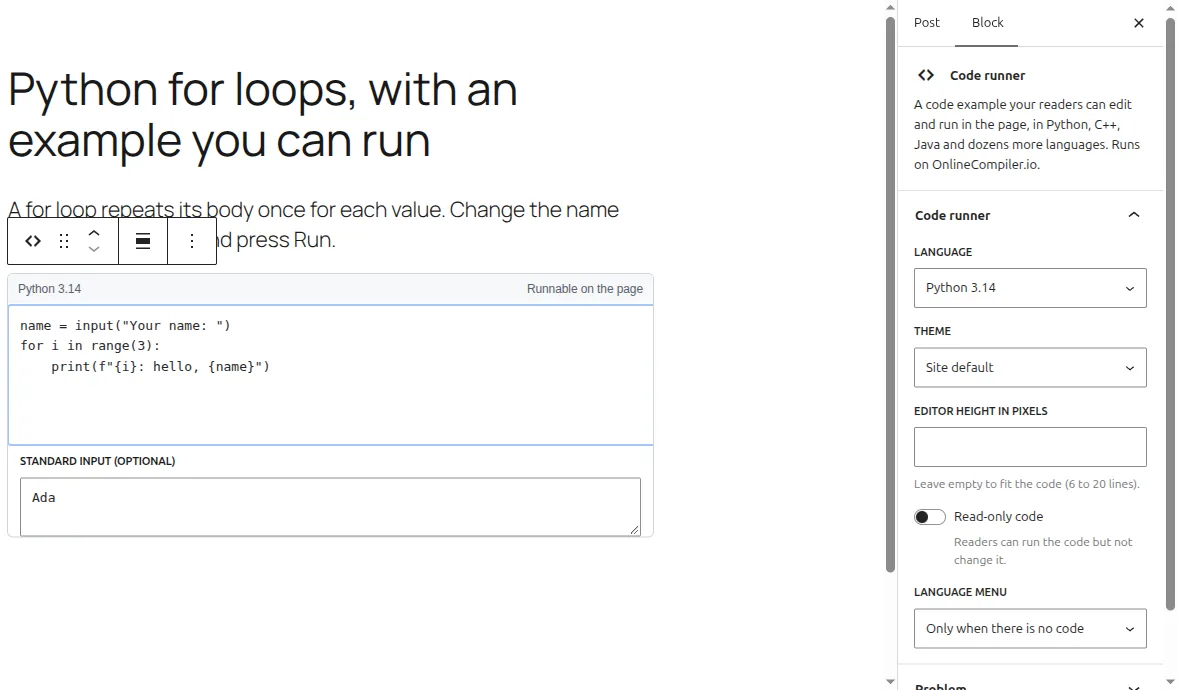
The block in the screenshot holds this program, with Ada as its input:
name = input("Your name: ")
for i in range(3):
print(f"{i}: hello, {name}")Your name: 0: hello, Ada
1: hello, Ada
2: hello, AdaThe block keeps the code exactly as you wrote it, including <, &, quotes
and square brackets, because WordPress stores it in the block's settings rather than in the post's text.
That makes the block the right choice for C++ includes, generics and HTML.
How do I add one in the classic editor?
Use the [onlinecompiler] shortcode, with the code between the opening and closing tags:
[onlinecompiler lang="python"]print("Hello")[/onlinecompiler]This Java example reads two numbers from its input, here 3 and 4, and printed one line when it ran on our test site:
[onlinecompiler lang="java" stdin="3\n4"]
import java.util.Scanner;

public class Main {
    public static void main(String[] args) {
        Scanner in = new Scanner(System.in);
        int a = in.nextInt(), b = in.nextInt();
        System.out.println("a < b? " + (a < b) + " & sum " + (a + b));
    }
}
[/onlinecompiler]a < b? true & sum 7Every attribute is optional:
| Attribute | What it does |
|---|---|
lang | A compiler id, such as python-3.14 or g++-15, or a short name: python, c, cpp, java, js, ts, go, rust, php, sql and the others. The default from Settings if left out. |
stdin | The program's starting input. Write \n for a new line: stdin="3\n4". |
theme | auto (the reader's system setting), light or dark. |
height | The editor's height in pixels. Left out, it fits the code (6 to 20 lines). |
readonly | 1 so readers can run the code but not change it. |
lang_select | true or false, to show or hide the language menu. |
problem | The id of a problem stored in your account (prob_...), shown instead of code. |
locale | pt or es for the buttons and messages in Portuguese or Spanish. |
The plugin undoes what the classic editor does to code (the paragraph and line-break tags it adds, and
the entities the visual editor saves), and keeps WordPress from curling the quotes. One thing it can't
undo: for authors who can't post unfiltered HTML, WordPress removes anything that looks like an HTML tag
when the post is saved, such as the <iostream> in #include <iostream>.
For code like that, use the block.
Can readers' answers be checked against tests?
Yes, with a stored problem. Create the problem in your OnlineCompiler.io dashboard, with a statement,
starter code and tests, and put its id (prob_...) in the block's Problem setting or the shortcode's problem attribute. Readers see the statement and starter code, and Judge checks their code against the problem's sample tests, with a verdict for each.
Grading against hidden tests, with a recorded score, needs one step the plugin doesn't take: your own server creates a session for each student, and the widget gets a Submit button. The widget documentation and how to build an online judge cover that setup, and the autograder API page covers grading a whole class.
Can I do it without a plugin?
Yes. The plugin writes the widget's own markup, so a Custom HTML block with a runcode div works too, once the widget script is loaded on the site:
<div class="runcode" data-key="YOUR_WIDGET_KEY" data-lang="python-3.14">
<pre>print("Hello from a Custom HTML block")</pre>
</div>
You load https://onlinecompiler.io/widget.js yourself (from your theme or a header and footer
plugin), escape < and & in the code, and need a role that can post
unfiltered HTML. The runnable code examples page
has those steps. This is also how to use widget features the plugin doesn't set, such as tests written into the page. For everything else, the plugin is simpler: it
loads the script only where it is needed and handles the escaping.
Why doesn't my code runner run?
| What you see | Why | Fix |
|---|---|---|
| The code as plain text, and "This code runner needs a widget key" for administrators | No widget key is saved. | Paste the key in Settings, OnlineCompiler.io. |
| "OnlineCompiler.io refused this widget's key (Origin not allowed for this API key)" | The key's allowed domain isn't the domain the page is on, often www against no www, or a staging site. | Set the allowed domain to the address in the browser's address bar, or make a second key for the staging site. |
| "OnlineCompiler.io refused this widget's key (Authentication failed)" | The key was mistyped, deleted or turned off. | Copy the key again from the Widgets page. |
| The runner shows Python when you asked for another language | The lang value isn't a compiler id or short name the plugin knows. | Use an id from the compiler list, such as openjdk-25, or a short name such as java. |
| Part of a C++ or HTML example is missing | The classic editor removed text that looked like an HTML tag. | Use the Code runner block. |
Frequently asked questions
Is the plugin free?
Yes, and it is open source (GPL). Running code uses your OnlineCompiler.io account, whose free plan has 100,000 runs a month with no credit card. Each press of Run is one run.
Do readers need an account?
No. Readers edit and run the code without signing in. Only the site owner needs an OnlineCompiler.io account, for the widget key.
Does the code run on my WordPress server?
No. It runs on OnlineCompiler.io, in a fresh sandbox for each run with no network access, thrown away afterwards. Your host needs no Python, Java or compiler, and nothing runs next to your site's files or database.
Does it slow down my site?
The widget script loads only on pages that have a Code runner, and it is deferred, so it doesn't hold up the page. Each runner connects to the service only when it scrolls into view; one showing a stored problem connects when the page loads.
What happens if OnlineCompiler.io can't be reached?
The code is in the page as text, so readers still see it, and search engines index it. Only the Run button needs the service.
Which languages can I use?
Python, C, C++, Java, C#, F#, Go, Rust, PHP, Ruby, Haskell, TypeScript, JavaScript, SQL, DuckDB, Bash, Fortran, Visual Basic, Kotlin, R, Swift, COBOL, Perl, Julia, Pascal, Octave, Assembly, Lua, OCaml, Common Lisp, Erlang, Elixir, Prolog, D, FreeBASIC, Dart, Clojure, Groovy, Scala, Zig, Nim, Crystal, Ada, PowerShell, Racket, Objective-C.
Does it work with page builders and course plugins?
The Code runner is a normal block and the [onlinecompiler] shortcode works wherever WordPress renders shortcodes, so it works in any post type that uses the block editor or shortcodes. We tested it in posts; if a builder or course plugin shows the shortcode as plain text, it doesn't render shortcodes in that place.
Is the widget key secret?
No. A widget key is made to sit in public pages: it can run code in the widget, but it can't call the REST API. Its allowed domain is what stops other sites from using it.